


Your Professional Touch Panel Supplier
Founded in 2017, MQ is a professional manufacturer of capacitive touchscreens and TFT LCD displays. With two production bases in Shenzhen and Dongguan, covering 3,000 square meters, our factory operates three dedicated production lines with a capacity of 500,000 touch panels per month. MQ’s team of experienced engineers supports both standard and custom display projects, equipped with Class 1000/100 cleanrooms and advanced optical bonding, lamination, and testing systems. provides reliable display solutions trusted by global clients.





Why choose us
Our Certificate
Our products are certified by IATF 16949 for the automotive supply chain and ISO 9001:2015 for management systems, ensuring top-tier quality across all stages of production.
Extensive R&D and Patented Solutions
With over 2,000 projects and 23+ patented solutions, our R&D department is at the forefront of cutting-edge display technologies, enabling us to support diverse client needs from IoT to aerospace.
Comprehensive Customer Support
From pre-sales technical consultation to after-sales services including warranty and on-site support, MQ provides tailored, responsive solutions for every step of the product lifecycle.
Sales Market
With 200+ international clients across Asia-Pacific, North & South America, and Europe, MQ serves industries like healthcare, automotive, and smart home systems, delivering displays that meet the most demanding requirements.
4-Wire Resistive Touch Screen
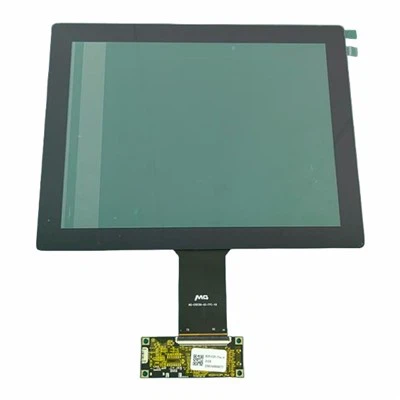
A 4-wire resistive touch screen is a type of touch technology that detects pressure points to determine touch positions. It consists of two transparent conductive layers separated by an insulating spacer. When the user applies pressure, the two layers make contact, and the controller calculates the exact touch point based on the change in resistance. With its simple structure and direct response mechanism, it is a preferred choice for scenarios demanding high durability and cost control.
|
Feature |
Specification |
|
Structure |
Two transparent conductive ITO layers with insulating dots |
|
Touch Input |
Finger (bare/gloved), stylus, pen, credit card |
|
Transmittance |
≥85% (Glossy), ≥78% (Matte) |
|
Surface Hardness |
3H |
|
Operating Voltage |
DC 5V |
|
Operating Temperature |
-20°C to +70°C |
|
Storage Temperature |
-40°C to +85°C |
|
Linearity |
≤ ±1.5% |
|
Operating Life |
>1 Million touches (polyester stylus), >5 Million (rubber stylus) |
|
Environmental Sealing |
IP65 |
|
Interface |
USB, RS232 (Depends on controller) |

Cost-Effective
Compared to capacitive, infrared, and other touch technologies, the 4-wire resistive touch screen is more economical to produce, making it ideal for large-scale deployment—particularly in industrial and medical fields where budget constraints matter.
High Durability and Reliability
4-wire resistive screens perform reliably in harsh conditions including dust, humidity, and grease. They work even when operated with gloves or styluses, ensuring wide adaptability.
Easy Installation and Maintenance
The straightforward structure allows for easy installation and simple maintenance. Standard interfaces and a variety of sizes are available. Custom options include cover glass lamination, FPC layout, and more.
Accurate and Smooth Operation
High Performance resistive touchscreen deliver fast responses and high positioning accuracy, making them well-suited for precision control systems such as surgical equipment and industrial HMIs.
Applications of 4-Wire Resistive Touch Screen
Consumer Electronics
Found in budget smartphones and tablets where cost-effectiveness is crucial without sacrificing basic functionality.
Industrial Equipment
Used in control panels where durability is essential; they can withstand harsh conditions like dust and moisture.
Medical Devices
Commonly found in equipment that requires reliable input methods; healthcare professionals can operate these devices effectively even while wearing gloves.
Point of Sale Systems
Widely used in retail for transaction interfaces due to their ease of use and reliability under frequent handling.
Top Layer: A flexible film that responds to touch. This layer is usually made from materials such as PET (polyethylene terephthalate) or other durable plastics.
Bottom Layer: Typically made of glass, providing a sturdy base that protects the conductive layer beneath.
Controller: An essential component that interprets the signals generated when the two layers make contact. The controller converts the analog signals into digital data that the device can understand.

How It Works of 4-Wire Resistive Touch Screen
Voltage Application
The controller applies voltage across the X-axis electrodes of the bottom layer. This creates a voltage gradient across the screen.
01
Touch Detection
When a user touches the screen, the top layer bends and makes contact with the bottom layer. This contact changes the voltage at the point of touch.
02
Signal Measurement
The controller measures changes in voltage at the contact point. By knowing the voltage applied and the resistance of the layers, it can calculate the exact coordinates of the touch.
03
Coordinate Calculation
The controller first determines the X-coordinate by measuring the voltage drop across the X-axis. It then applies voltage across the Y-axis electrodes and measures the voltage drop to find the Y-coordinate.
04
Data Processing
Once the coordinates are determined, this information is sent to the device's processor for action, allowing for real-time interaction.
05
Step-by-Step Guide to Testing a 4-Wire Resistive Touch Screen
Step 1: Visual Inspection
Begin with a visual inspection of the touch screen. Look for any labels or markings on the screen or its connector. Sometimes manufacturers as Reshine Display provide pinout diagrams that can simplify the process.
Step 2: Measure Resistance Between Pins
Using a multimeter set to resistance (ohm) mode, measure the resistance between each pair of pins:
1. Connect the probes to two of the pins.
2. Record the resistance value.
3. Repeat this for all combinations of pins.
In a typical 4-wire resistive touch screen, you should observe two pairs of low resistance values indicating the X and Y axes.
Step 3: Apply Voltage to X-Axis
1. Connect X+ to +5V and X- to Ground.
2. Measure the voltage at Y+ and Y- with the multimeter.
This step helps confirm which pins correspond to the X and Y axes.
Step 4: Apply Voltage to Y-Axis
1. Connect Y+ to +5V and Y- to Ground.
2. Measure the voltage at X+ and X-.
This will help you verify that your connections are correct.
Step 5: Test Touch Response
Connect the touch screen to a microcontroller (like an Arduino). Write a simple program that reads touch coordinates based on voltage changes when pressure is applied to different areas of the screen.This program will output the coordinates detected by touching different areas of the screen.
Common Issues and Troubleshooting
Unresponsive Screen
Check connections and ensure that power is supplied correctly.
Incorrect Coordinates
This may indicate incorrect pinout or wiring issues. Double-check your measurements.
Noise in Touch Response
Poor grounding or interference can cause this issue. Ensure proper grounding in your setup.
Further Considerations When Working with Touch Screens
Temperature Sensitivity: Extreme temperatures can affect both sensitivity and accuracy; ensure that devices are operated within specified temperature ranges.
Humidity Effects: High humidity levels may lead to condensation on screens which can interfere with performance; protective casings might be necessary in such environments.
Cleaning Procedures: Use appropriate cleaning solutions designed specifically for electronic devices; avoid abrasive materials that could scratch surfaces.
Calibration Checks: Regularly recalibrate your device as needed—especially after physical impacts or environmental changes—to maintain accuracy in response.
FAQ
As one of the most professional touch panel manufacturers and suppliers in China, we're featured by quality products and good price. Please rest assured to buy bulk customized touch panel from our factory.